
Real-Time TCP & UDP Network Monitor for Windows
TCPeye 3.0 delivers granular visibility into your Windows network traffic. Inspect live TCP/UDP connections, listening ports, remote IP addresses, and GeoIP destinations process by process. Block suspicious inbound and outbound sockets with one click using native Windows filtering engine rules.
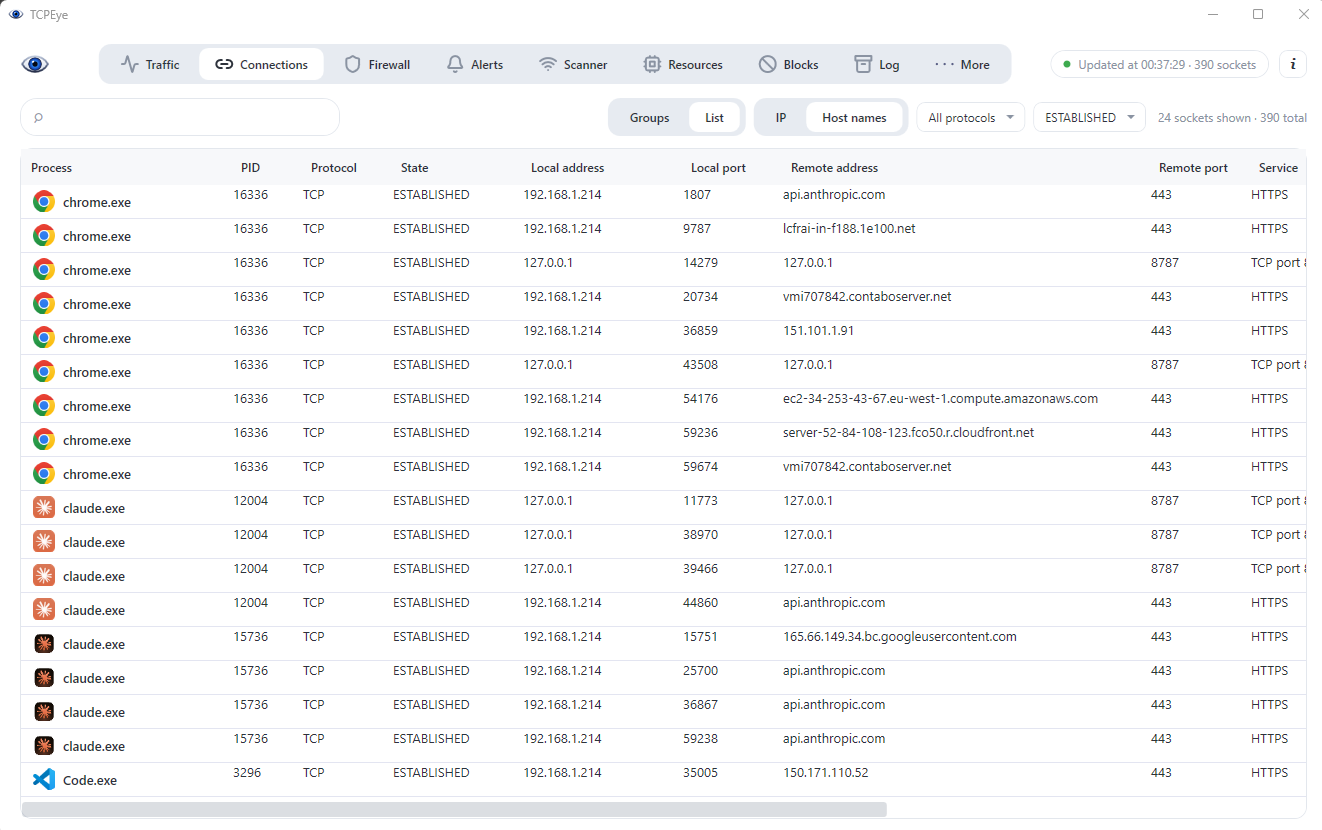
Inspect and Control Sockets in 3 Direct Steps
Unlike noisy packet sniffers, TCPeye 3.0 resolves network telemetry straight to the responsible executable, PID, and destination country.
- 1
Inspect Active TCP & UDP Endpoints
Launch TCPeye 3.0 to inspect every socket: remote IP addresses, local listening ports, resolved DNS hostnames, and transfer speed broken down by application.
- 2
Identify Stealth & Suspicious Processes
Identify unverified background services, malware beacons, and unauthorized telemetry immediately. New background connections get flagged in real time.
- 3
Enforce Persistent Firewall Blocks
Block suspect binaries, remote IP subnets, or domain namespaces instantly. Rules commit straight to the Windows Firewall Engine (WFP) and remain enforced even when TCPeye is closed.
Live Bandwidth Graphs & GeoIP Telemetry
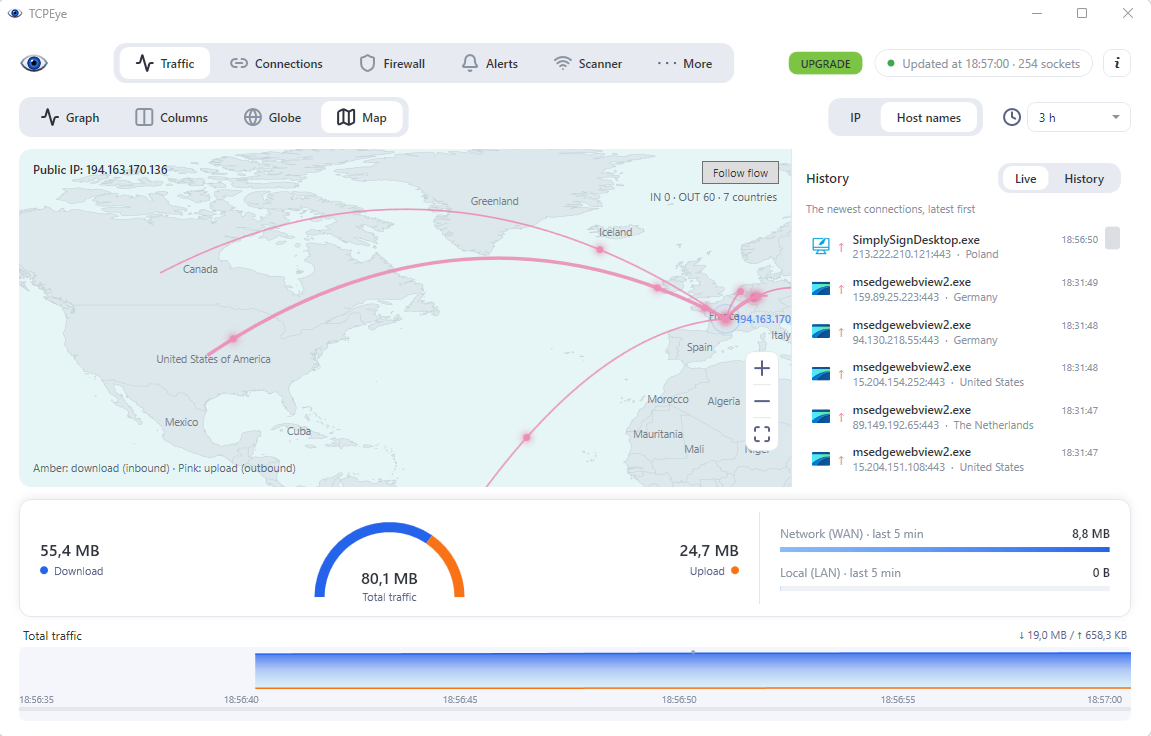
Track upload and download curves down to the second. Correlate unexpected bandwidth spikes with specific binaries and remote geographies.
Socket-to-Process Attribution
Resolve every TCP/UDP stream to its exact process name, file directory, PID, and digital signature status without missing temporary spikes.
Interactive 3D Globe & Country Map
Plot outbound connections geographically. Identify foreign data exfiltration routes instantly with intuitive amber (download) and pink (upload) directional flows.
Port Scan & Intrusion Warning
Detect external port sweeps and unauthorized internal network probes in real time, neutralizing reconnaissance attempts before lateral movement occurs.
Precision Application-Layer Firewall
Granular firewall control without the complexity of native Windows Defender menus. Understand exactly what you permit or isolate.
Dual Inbound & Outbound Enforcement
Define independent bidirectional policies for each application. Rules are saved directly into the Windows security stack for zero performance overhead.
CIDR, IP Range & Domain Level Blocking
Blacklist toxic IP addresses, malicious CIDR blocks, or entire domains across all software, isolating malicious command-and-control servers instantly.
TCP/IP Stack Hardening
Built-in protection profiles: disable NetBIOS exposure, drop spoofed traffic, enforce SYN attack mitigation, and reject external management requests.
Kernel & System Process Safeguards
Built-in intelligence prevents the accidental termination or blocking of critical Windows OS dependencies, avoiding accidental blue screens or network drops.
Local Subnet & IoT Vulnerability Scanner
A hardened PC is vulnerable if devices on the same Wi-Fi are breached. TCPeye 3.0 audits your entire local subnet for exposed ports and weak configurations.
IP Cameras
Routers & Gateways
Network Printers
NAS & Storage
IoT Sensors
Automated Subnet Discovery
Catalog all network endpoints on your LAN. Identify MAC vendors, machine hostnames, and active TCP/UDP listening services automatically.
Proactive Vulnerability Assessment
Scan internal nodes for open Telnet, unsecured RTSP video feeds, outdated UPnP implementations, and default web management interfaces.
Unified Single-Pane Monitoring
Investigate local network threats and computer sockets within the same interface, transitioning from an alert to a firewall rule in seconds.
Zero Telemetry. Local Privacy First.
- 100% Local Execution. The core TCPeye 3.0 network engine operates completely offline. No socket data, packet logs, or IP records leave your device.
- Optional Pro AI Assistant. Security queries sent to the Softedition license server transmit only the user query and an anonymized session context. Chats are processed transiently and never stored.
- Transparent Licensing. Single device hardware-locked activation with offline grace periods of up to 60 days.
TCPeye Free vs TCPeye 3.0 Pro
Use the free edition as a permanent TCP/UDP monitor, or upgrade to Pro for enterprise-grade firewall filtering and AI-assisted triage.
| Capability | TCPeye 3.0 Free | TCPeye 3.0 Pro |
|---|---|---|
| Live TCP & UDP Traffic | Real-time by app, host, port & GeoIP | Included |
| Traffic Graph & 3D Globe | Full real-time visualization | Included |
| Socket-to-Process Inspector | Full path, PID & socket state | Included |
| Port Scan Intrusion Alerts | Real-time notifications | Included |
| LAN Device & Port Scanner | Full subnet discovery | Included |
| Per-App Inbound/Outbound Firewall | No | Yes (WFP Native Engine) |
| Domain & IP Subnet Blacklisting | No | Yes |
| Persistent Activity History Logs | No | Structured Daily Logs |
| AI Security Assistant | No | Up to 300 queries / month |
| License Model | Free Lifetime | $19.59 (One-time payment / PC) |
Frequently Asked Questions
What makes TCPeye 3.0 an essential TCP & UDP monitor?
TCPeye 3.0 combines live socket monitoring (similar to CurrPorts or TCPView) with deep per-process bandwidth graphing, GeoIP mapping, and direct application firewall control. You can see which process holds an open port and block its network access with one click.
Is TCPeye 3.0 Free completely free to use?
Yes. The free version provides perpetual live TCP/UDP monitoring, listening port audits, port-scan alerts, bandwidth telemetry, and LAN device scanning. Pro adds the per-app bidirectional firewall, domain blocking, and the AI diagnostics module.
Does TCPeye 3.0 require administrator privileges?
Yes. Querying system-wide network sockets, binding to raw traffic statistics, and editing the Windows Filtering Platform rules require elevated local administrator rights.
How does TCPeye compare to GlassWire or NetLimiter?
TCPeye 3.0 is built natively for Windows 10 and 11 (64-bit) without external runtime dependencies (no heavy .NET or Electron runtimes). It introduces local subnet IoT vulnerability audits and offers a one-time lifetime payment rather than recurrent monthly subscriptions.
Which Windows operating systems are supported?
TCPeye 3.0 supports 64-bit editions of Windows 11 and Windows 10. The executable is lightweight, standalone, and does not require third-party frameworks.
Take Full Control of Your Network Sockets.
Monitor active TCP/UDP connections, audit local devices, and enforce application-level firewall security with TCPeye 3.0.
Compatible with Windows 11 & 10 (64-bit). Administrator privileges required.