
Recover lost files on Windows without touching the source drive.
RecoverPro restores deleted documents, photos and videos from NTFS, FAT and exFAT drives. It opens the source in strictly read-only mode, so nothing you do during recovery can overwrite the data you are trying to save.
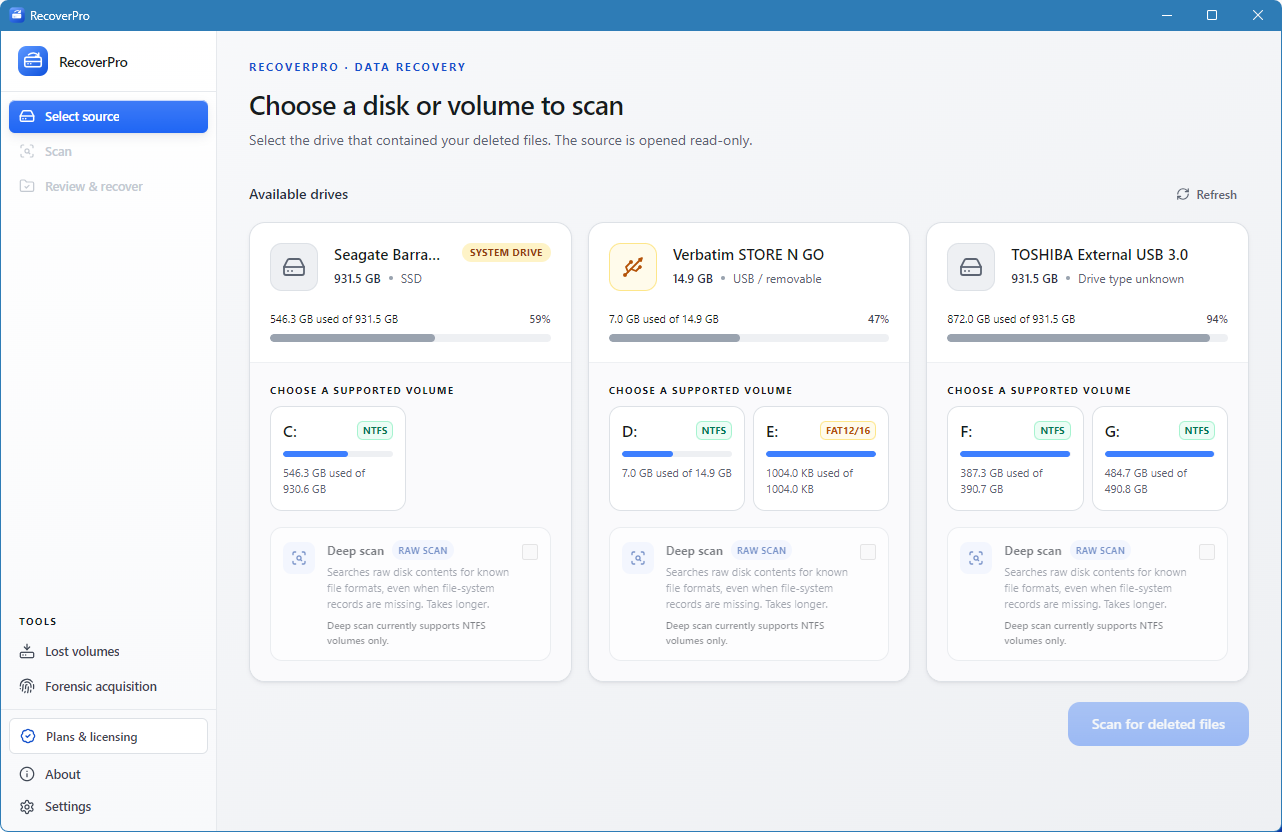
How to recover lost files in 3 steps
A direct workflow built to rescue data without risking permanent deletion.
- 1
Select the target drive
Choose the volume where the files were lost. RecoverPro locks access to read-only and warns you if the drive is a TRIM-enabled SSD.
- 2
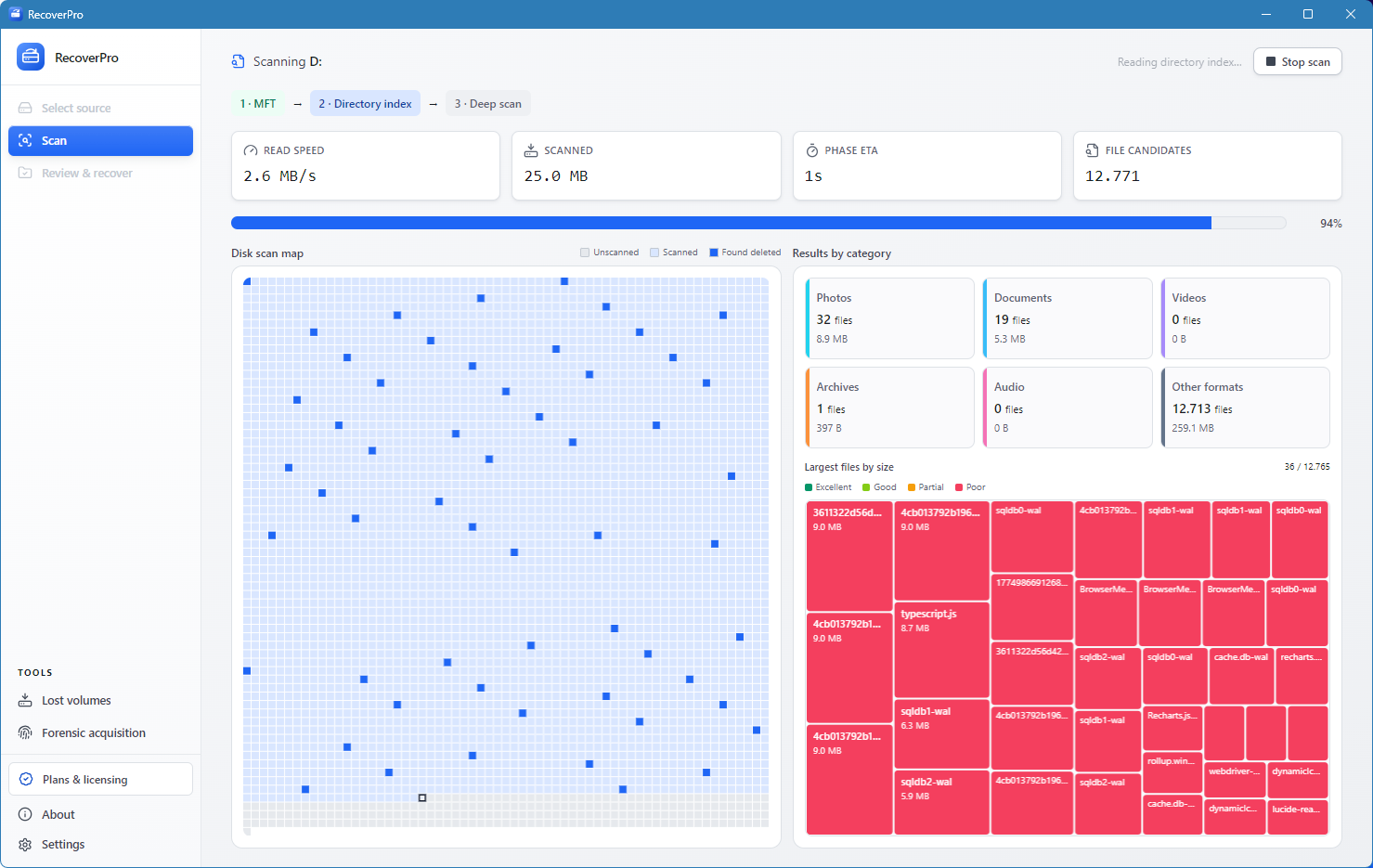
Run a Fast or Deep Scan
Start with a quick pass over the Master File Table (MFT). If that is not enough, run a raw sector Deep Scan to carve photos, archives and documents.
- 3
Review and save
Check each file’s integrity rating (Excellent, Good, Partial, Poor), preview the candidates, then export them to a different drive.
Fast Scan or Deep Scan: which one do you need?
Start with Fast Scan after a simple deletion. Switch to Deep Scan when the drive was formatted or the folder structure is gone.
| Fast Scan | Deep Scan | |
|---|---|---|
| What it reads | File system records such as the NTFS Master File Table | Raw sectors of the whole volume |
| Best for | Recently deleted files on a healthy drive | Formatted drives and missing or damaged directories |
| How it finds files | Existing file system entries | File header and footer signatures |
| Names and folders | Usually preserved | May be lost, because the directory index is gone |
| Speed | Quick | Slower, because it reads every sector |
Engineered to recover lost files without data loss
Zero Overwrite Guard
The source media is opened exclusively in read mode. Nothing in the recovery algorithm writes to the drive, which removes the risk of destroying recoverable sectors.
Signature Deep Carving
Recover files even when directory indexes are gone. Deep Scan recognizes raw headers and footers for JPEG, RAW (CR2), PNG, PDF, Office OOXML, ZIP and MP4/MKV.
Pre-Recovery Rating
Every candidate shows a transparent recoverability rating. Files stay marked as provisional until verified, so you know what is recoverable before you save.
SSD TRIM detection
RecoverPro detects TRIM on SSDs and alerts you before a long scan, so you do not spend hours scanning blocks that are already purged.
Supported file formats
Forensic Acquisition Mode
Need to preserve verifiable digital evidence? Create bit-for-bit images with cryptographic hashes, examiner logs and legal authority validation.
Lost a file? Follow these 3 rules immediately.
- Stop using the drive.Do not save files, browse or install software on that partition.
- Use read-only scanning.Avoid tools that write cache or temporary files to the source drive.
- Restore to another disk.Always save recovered files to an external drive or a separate partition.
Frequently asked questions
How do I recover lost files after formatting a drive?
A quick format only replaces the file system tables, so the data itself often remains. Use RecoverPro’s Deep Scan to read raw volume sectors and extract files through their header signatures.
Can I recover lost files from an SSD with TRIM?
If TRIM has already purged the blocks, the data cannot be recovered. RecoverPro detects TRIM on SSDs and alerts you before running prolonged scans.
What is the difference between Fast Scan and Deep Scan?
Fast Scan reads file system records such as the MFT and lists deleted files with their names and folders. Deep Scan reads raw sectors and identifies files by their headers and footers. It works when directory information is gone, but original names and folder paths may be lost.
Where should I save recovered files?
Always save them to a different drive or partition. Writing to the source drive can overwrite the very data you are trying to recover.
Does RecoverPro work on Windows 11 and 10?
Yes. RecoverPro is fully compatible with Windows 11 and Windows 10, and supports internal and external drives formatted as NTFS, FAT32 and exFAT.
Start recovering your lost files safely.
Non-destructive, read-only file recovery for Windows. Retrieve your files before they are gone for good.
Compatible with Windows 11 and 10. Native 64-bit performance.